How to use SaveInsta: Download Instagram Videos & Photos
In this article, I will show you how to use Save Insta to download any Instagram media, including photos, videos, Reels, Stories, and profile pictures. Our web-based tool operates directly in your browser with no installation or registration required, helping you download your favorite content quickly and safely.
1. Key advantages of Save Insta
- Intuitive and Simple Interface: Just copy the URL of the Instagram post or profile and paste it into our search bar; the high-quality download will be ready in an instant.
- Anonymous and Secure: To protect your privacy, Save Insta never requests login credentials or personal data, allowing you to browse and save content anonymously.
- Support for All Content Types: Everything from standard photos and videos to high-energy Reels, Stories, and even profile avatars can be saved in their best original quality.
- Unlimited Access, Zero Cost: Enjoy a free service with no hidden fees or download caps. No need for premium upgrades or 'PRO' accounts to access full features.
- Works on all devices: Whether you use Android/iOS phone, tablet or PC, the tool still supports and works well on browser or app.
2. How to find and copy Instagram post links
- Open the Instagram application on your phone or visit Instagram.com in a web browser.
- Navigate to the specific post (Photo, Video, Reel, Story, or Highlight) that you wish to save.
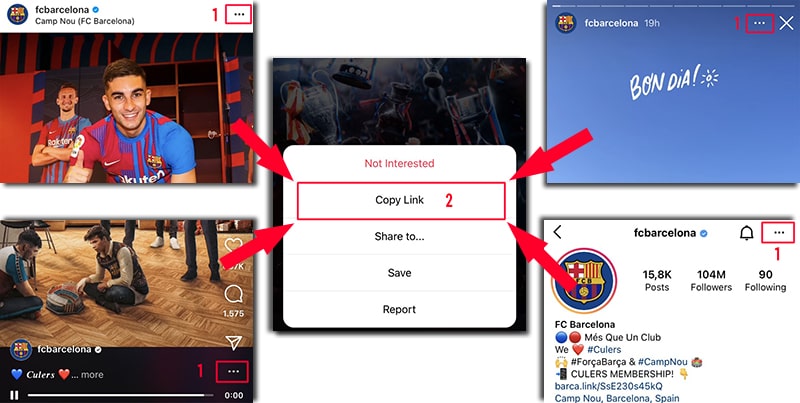
Click the three-dot icon (•••) or the Share button, then select Copy Link to store the URL in your clipboard.
3. Save Instagram photos and videos to your device
Step 1: Open your preferred web browser (Chrome, Safari, Firefox, etc.) and navigate to the Save-Insta.to website.
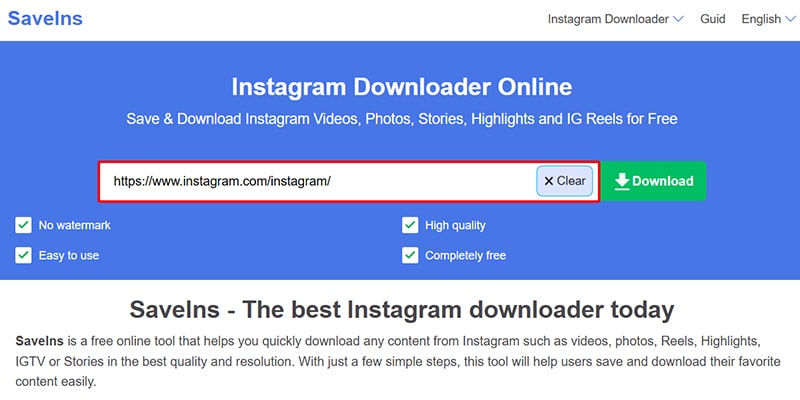
Step 2: Paste the Instagram link you just copied into the input box and click the Download button to begin the process.
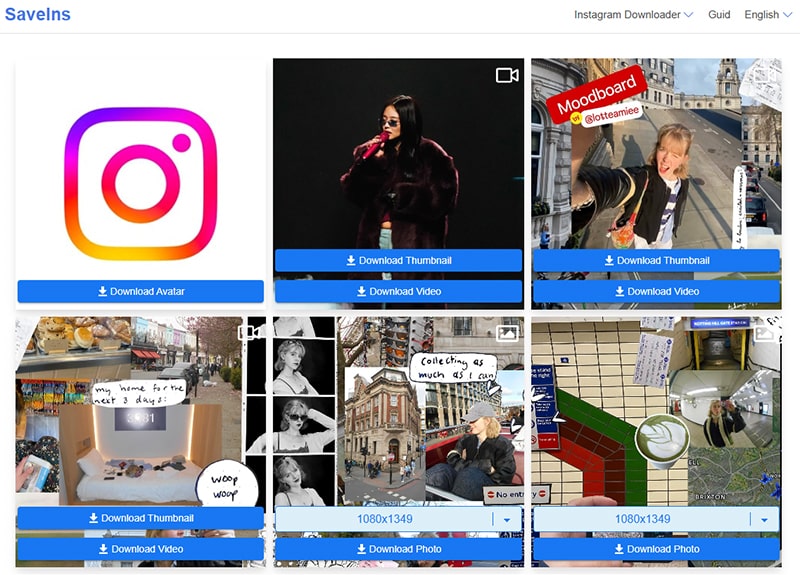
Step 3: Wait a moment for the tool to process. Once the media appears, choose your desired quality and click Download to save it to your device.
4. Important Privacy and Copyright Notice
- Respecting User Privacy: Save Insta supports downloading media only from public Instagram accounts. Content from private accounts is protected and cannot be accessed or downloaded via our tool to ensure user privacy.
- Intellectual Property and Copyright: All media (photos, videos, music) are the property of their respective creators or brands. If you intend to reuse content for commercial purposes, please obtain permission from the owner and comply with local laws.
Save Insta is a powerful and efficient Instagram downloader that lets you save photos, videos, Reels, Stories, and profile pictures in just a few clicks. With no installation or login required, our tool ensures a fast and seamless experience. Try Save Insta today and share it with your friends if you find it helpful!